

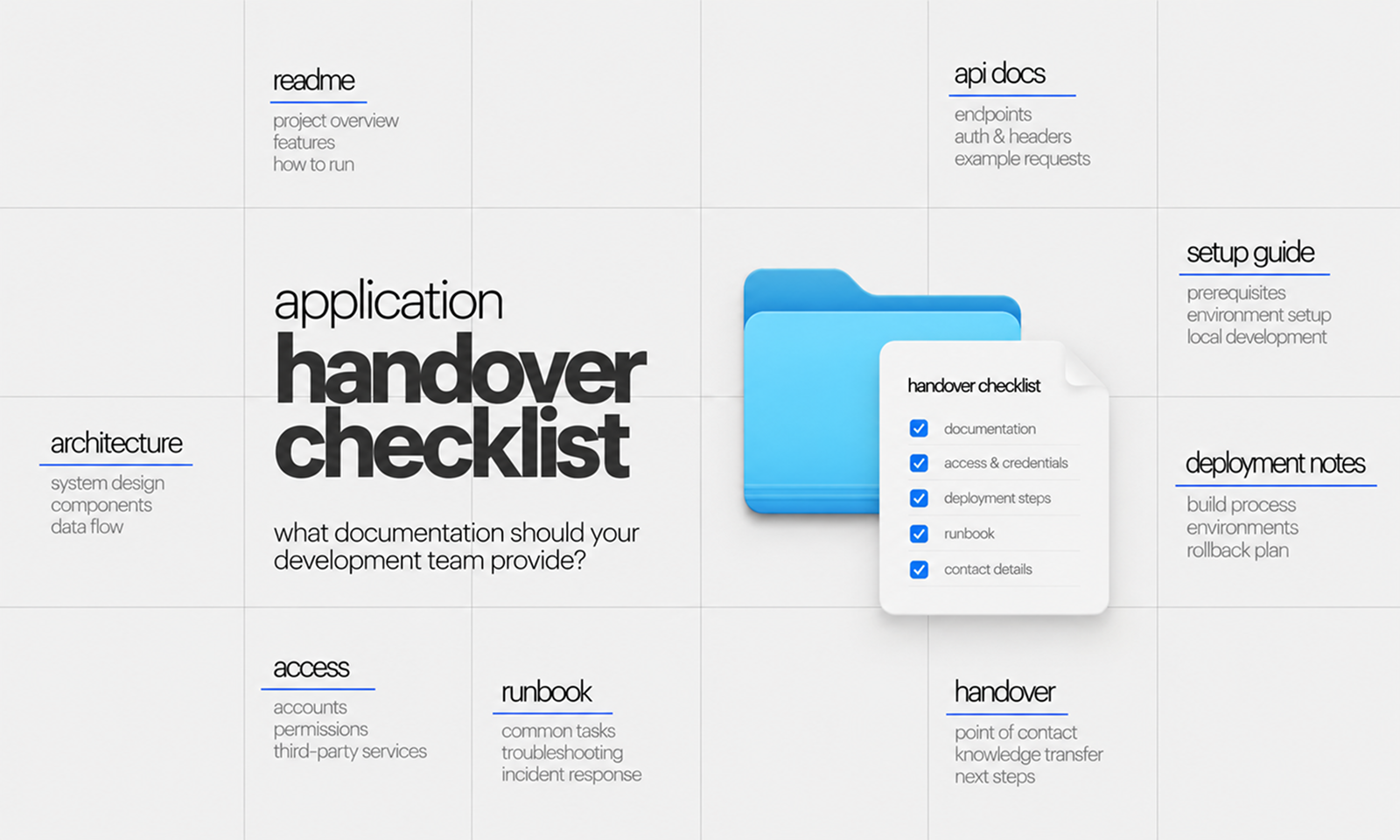
The development team says the application handover is complete.
You have the source-code repositories. Production credentials have been transferred. There is a folder called “Documentation,” and somebody has walked the incoming team through the system on a video call.
Then the first real change needs to be made.
The new team discovers that the repository does not explain how to build the application locally. Nobody has documented which scheduled jobs run in production. One third-party integration belongs to an account controlled by a former developer. The mobile signing certificate is stored somewhere else, while an important database migration procedure exists only in an old chat thread.
Technically, the code was handed over.
Operationally, the application was not.
A proper application handover transfers enough technical, operational and contextual knowledge for another capable team to understand the system, run it, change it, release it and respond when something fails without remaining dependent on the outgoing developers.
That requires more than a source-code dump.
DORA's research treats documentation quality as an important software-delivery capability, emphasizing qualities such as clarity, findability and reliability rather than simply the amount of documentation a team produces. DORA: Documentation Quality
For Levelworks, a successful handover is closely connected to Well Documented App Health, with important links to Version Controlled, Explainable & Debuggable, Supported and Seamlessly Updatable. If the next team cannot confidently operate or change the application, ownership has not really transferred.
The incoming team should not need to understand the repository structure before understanding what the application does.
Begin with a short application overview that explains:
This can live in a repository README or central documentation index.
GitHub recommends using a repository README to explain what a project does, how people can get started, where they can get help and who maintains it. GitHub: About repository README files
For a handover, the README should function as the front door rather than attempting to contain every technical detail.
A useful opening structure might be:
Application
├── What it does
├── Architecture
├── Repositories
├── Local setup
├── Environments
├── Deployment
├── Integrations
├── Operations
└── Ownership / contacts
The incoming maintainer should be able to start there and know where to go next.
Hand over every repository required to operate the application—not only the main application repository.
Depending on the system, this may include:
Document the purpose of each repository and how the repositories relate to one another.
The handover should also identify:
Do not leave the incoming team trying to work out whether legacy-api, api-old, and api-prod-v2 are all still relevant.
Repository ownership matters too. GitHub's CODEOWNERS mechanism, for example, allows organizations to associate parts of a repository with responsible individuals or teams and can be combined with review requirements. GitHub: About CODEOWNERS
After a handover, those ownership references should point to people who still exist in the operating model.
[Internal Link: “How Git Makes Application Maintenance Safer”]
Source code provides implementation detail. It does not provide an efficient map of the system.
The incoming team should receive architecture documentation showing the major components and their relationships.
At minimum, document:
The C4 model is one useful approach because it separates architecture into understandable levels rather than putting the entire system into one enormous diagram. A system-context view shows how the application fits into its wider environment, while container and component views progressively add detail.
For many handovers, two diagrams are especially valuable:
System context diagram: What external users and systems interact with the application?
Container or service diagram: What applications, services and data stores make up the system internally?
The objective is not architectural artwork. The next engineer should be able to look at the diagram and understand where to begin investigating a problem or change.
One of the quickest tests of documentation quality is asking a new engineer to run the application without verbal assistance.
The development team should document:
Sensitive values should not be placed directly in ordinary documentation. Instead, explain where approved credentials and secrets are obtained.
Where the application contains multiple services, document startup dependencies clearly.
For example:
1. Start PostgreSQL
2. Start Redis
3. Run database migrations
4. Start API
5. Start background worker
6. Start frontend
A setup document that simply says “run the project locally” is not a setup document.
A useful handover test is whether an engineer unfamiliar with the system can reach a working development environment by following the instructions.
The incoming team needs to understand where the application runs.
Document environments such as:
For each environment, record the appropriate information about:
You do not need to duplicate configuration that already exists accurately in version control. Link to the authoritative configuration instead.
That distinction matters.
Documentation should explain the environment and point maintainers to the source of truth rather than creating a second configuration record that will inevitably drift.
DORA recommends keeping configuration and other important delivery artifacts in version control to improve traceability and reproducibility. DORA: Version Control
The handover should explain exactly how a code change becomes a production release.
Include:
A diagram is often useful:
Pull request
↓
Automated tests
↓
Merge
↓
Build artifact
↓
Staging
↓
Validation
↓
Production approval
↓
Production
If production deployment still contains manual steps, document them precisely.
Statements such as “Alex usually handles production releases” are warning signs during a handover. The new team needs the process, not merely the name of the person who knows it.
[Internal Link: “CI/CD for App Maintenance: How Automated Releases Reduce Risk”]
Database handover should go beyond providing a connection string.
Document:
You do not need prose describing every table if the schema itself is clear and maintained.
Focus documentation on what is difficult to infer.
For example:
customer_status_history must not be deleted during normal customer removal because historical records are required by the reporting service.
That information can prevent a future maintainer from making a seemingly harmless cleanup that changes important behavior.
If migrations require a particular sequence or have historically caused operational issues, record that as well.
Third-party integrations are common handover failure points because the code is only one piece of the relationship.
For every significant integration, document:
Typical integrations include:
Pay particular attention to ownership.
If a production payment account, OAuth application, domain or cloud resource belongs to the personal account of an outgoing developer, that should be corrected before the handover closes.
The incoming team should control the application infrastructure it is expected to maintain.
Do not create a spreadsheet containing all production passwords and call it a handover.
Instead, provide an inventory showing which access exists and where credentials are securely managed.
The inventory may include:
For each system, confirm:
The handover should leave no business-critical account dependent on an individual's personal email address or authenticator.
For mobile applications, explicitly include ownership of Apple and Google developer accounts, signing keys and release credentials where applicable.
A new team can read the implementation.
What it cannot reliably infer is why important decisions were made.
Document significant architectural decisions such as:
Architecture Decision Records are useful for this purpose. Martin Fowler describes an ADR as a short record containing a decision, the context behind it and its significant consequences. When a decision changes, the original record can remain intact and point to the superseding decision, preserving the history of how the architecture evolved. Martin Fowler: Architecture Decision Record
This prevents the new team from “fixing” an unusual design decision without knowing what constraint originally created it.
The incoming team needs instructions for operating the live application, not only developing it.
Create or transfer runbooks for predictable operational situations such as:
For each runbook, include:
When to use it.
What event or condition triggers the procedure?
Procedure.
What steps should be followed?
Verification.
How does the maintainer know the procedure succeeded?
Recovery or escalation.
What happens if it does not?
Google Cloud's operational guidance recommends maintaining incident runbooks or playbooks that document triage, investigation, resolution, communication, tools and important contacts—and reviewing them so they remain current. Google Cloud: Manage incidents and problems
Google's SRE guidance goes further: its experience found that thinking through and recording emergency procedures in advance produced roughly a threefold improvement in mean time to repair compared with improvising responses. Google SRE: Emergency Response and Playbooks
That makes operational documentation one of the most valuable pieces of a handover.
The incoming team should know how to tell whether the application is healthy.
Document:
For significant alerts, include enough context to explain:
Avoid dumping dozens of monitoring URLs into a document without explanation.
The useful handover question is whether a new maintainer receiving an alert can determine where to investigate next.
Saying “backups are enabled” is not enough.
The handover should identify:
If disaster recovery relies on infrastructure, credentials or external accounts, those dependencies must also be included in the handover.
[Internal Link: “Backup and Disaster Recovery: What Every App Maintenance Plan Needs”]
The incoming team should understand what automated and manual protection already exists before making changes.
Document:
Also identify any critical workflows that currently depend on manual regression testing.
The purpose is not to produce a testing textbook. It is to prevent the new team from assuming coverage exists where it does not.
DORA's test-automation guidance emphasizes fast, reliable testing throughout delivery rather than relying solely on a separate manual regression phase. DORA: Test Automation
A handover should make the existing confidence level visible.
Do not hand over only the idealized version of the application.
The next team needs to know where the weak spots are.
Document significant:
Explain impact and context rather than creating a list called “technical debt” containing hundreds of vague items.
For example:
Reporting worker still uses Framework X version Y. Upgrade was postponed because library Z currently blocks compatibility. No immediate production impact, but the framework leaves support in Q2.
That is actionable context.
“Reporting service needs modernization” is not.
Background work is easy to overlook because it may not appear directly in the user interface.
Document:
Include their frequency, purpose and failure behavior.
The incoming team should know what runs automatically at midnight before somebody discovers it by receiving an alert at 12:05 a.m.
Some maintenance risk comes from business logic rather than technical architecture.
Capture important rules such as:
Focus on rules whose rationale matters.
If code says:
if order_age > 90 days:
prohibit_refund()
the maintainer can see what happens.
What they need documentation to explain is why 90 days exists and whether anybody is allowed to change it.
Even excellent technical documentation cannot answer every future question.
The handover should identify responsibility for major areas such as:
Area
Responsible party
Application maintenance
Team / vendor
Cloud infrastructure
Team
Database
Team
Security escalation
Role
Billing provider
Business owner
Domain/DNS
Account owner
Product decisions
Product owner
Critical incident escalation
Named role/process
Use roles and maintained team references where possible rather than building documentation around one individual's name.
Ownership should also reflect what has actually transferred. If the incoming team is responsible for production but cannot modify DNS or access the payment provider, the operating model is incomplete.
The most important step in a handover is testing the handover itself.
The incoming team should perform key activities before the outgoing team disappears.
Examples include:
Any step that requires undocumented assistance reveals a handover gap.
Write the missing information down and repeat the exercise.
This is much stronger than asking the incoming team:
“Does everything make sense?”
Most documentation problems only become obvious when someone attempts to use the material.
Before accepting technical ownership, verify that you have:
Area
Required handover
Overview
Application purpose, users, major workflows
Code
All repositories, branches, ownership
Architecture
System and component diagrams
Development
Local setup and test-data instructions
Environments
Infrastructure and configuration map
Deployment
Build, release, validation and rollback process
Database
Schemas, migrations, backups, important constraints
Integrations
Providers, authentication, accounts, failure behavior
Access
Organizational ownership of infrastructure and third-party accounts
Decisions
Important ADRs and architecture constraints
Operations
Runbooks and recurring maintenance procedures
Monitoring
Dashboards, logs, alerts and troubleshooting paths
Testing
Test suites, execution, known coverage gaps
Known issues
Technical debt, workarounds and recurring problems
Background work
Jobs, queues, workers and schedules
Business logic
Important rules that require context
Ownership
Support, technical and escalation responsibilities
Not every application needs the same depth in every category.
A five-service SaaS platform requires more documentation than a simple internal web application. The handover should be proportionate to the consequences of misunderstanding the system.
A development team can deliver every document in this checklist and still perform a poor handover if the material is inaccurate, fragmented or impossible to use.
The real test is what happens after responsibility changes.
Can the new team build the application without calling the previous developer?
Can they identify where a production error originated?
Can they release a small change safely?
Can they explain the major dependencies?
Can they restore service using documented procedures?
Can they access the accounts they are responsible for operating?
That is why Well Documented App Health is not about possessing documentation. It is about preserving enough reliable application knowledge for maintenance to continue when people, vendors and teams inevitably change.
A strong handover leaves the previous development team available as useful historical context, not as an undocumented runtime dependency of the application.
When that dependency has been removed, ownership has genuinely changed hands.









